
AI Integration
This section describes AI integration in CAP Java: building agents on top of your CDS services and configuring the LLM chat models they use.
Agents Alpha
A CAP agent turns a CDS service into a conversational endpoint. It answers natural-language requests by using the service's entities, actions, and functions as tools, backed by an LLM. Agents speak the A2A protocol, so any A2A-compatible client can talk to them.
A2A protocol version
For compatibility reasons with Joule and Agent Gateway, version 0.3.0 of the A2A protocol is used by default.
Alpha — Not for Production
CAP Java agents are under active development. The data model and APIs may change.
Adding the Dependency
Add the agent adapter to your srv/pom.xml:
<dependency>
  <groupId>com.sap.cds</groupId>
  <artifactId>cds-adapter-agent</artifactId>
</dependency>
Import the agent-memory model into your project's CDS model:
using from 'com.sap.cds/ai/agent-memory';and use the resolve goal of the CDS Maven Plugin.
Persistent Agent Memory
There is no automatic cleanup yet. Clear the session table periodically.
Defining an Agent
Annotate a service with @agent to expose it as an agent:
@agent
service TravelService {
  entity Travels   as projection on db.Travels;
  entity Flights   as projection on xflights.Flights;
  action createTravel(Description: String, BeginDate: Date, EndDate: Date) returns Travels:ID;
  action addFlightToTravel(TravelID: Travels:ID, FlightID: Flights:ID, FlightDate: Date);
}
Define a tailored service for your agent
Define a dedicated service for your agent, tailored to its specific use case.
The following tools are derived from the service and made available to the agent:
- A generic query tool allows the LLM to read data via CDS QL across all entities defined in the service.
- Unbound actions and functions become individually callable tools, invoked by name.
Unbound actions and functions only
Only unbound actions and functions are supported as tools. Bound actions and bound functions aren't supported yet.
By default the agent is served under /a2a/<service-path>, with its agent card available at the corresponding .../.well-known/agent-card.json endpoint.
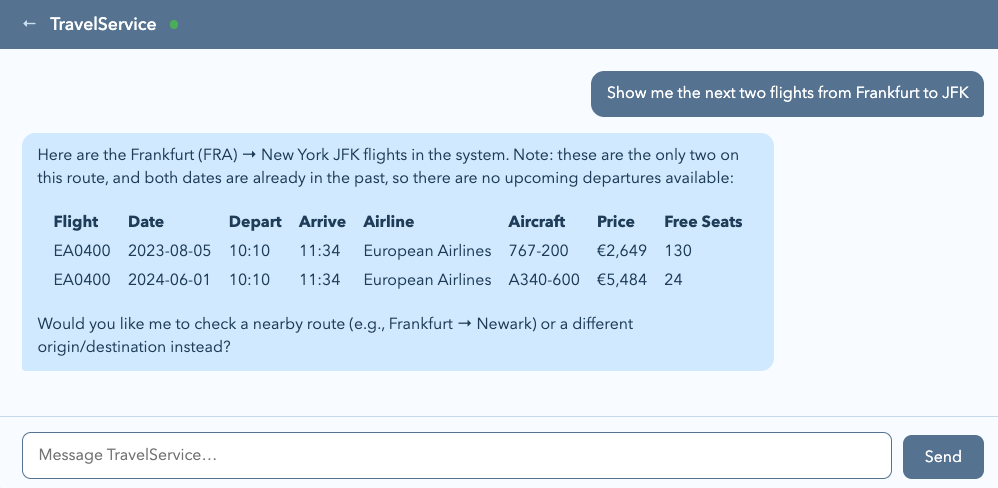
During development, a built-in chat UI lets you try out your agents in the browser from CAP's index page. It's disabled by default in the production profile.
Customizing an Agent
Without further configuration, the agent derives a system prompt and its advertised skills from the CDS model. To customize both, add resources under <ServiceName>-agent/ on the classpath (for example srv/src/main/resources/TravelService-agent/):
TravelService-agent/
├── AGENTS.md                     # system prompt + agent card metadata
└── skills/
    ├── browse-travels/SKILL.md
    └── create-travel/SKILL.md
AGENTS.md holds the system prompt as its body, with optional YAML frontmatter for the agent card:
---
name: Travel Assistant
version: 2.0.0
description: Helps customers browse and book travels
---
You are a helpful travel assistant. Help customers find flights and manage their travels.
Always use the provided tools to answer questions — do not make up data.
Each skills/<id>/SKILL.md describes one skill advertised in the agent card:
---
name: browse-travels
description: Browse and search available travels
metadata:
  tags: [travels, search]
  examples:
    - Show me all open travels
    - Find travels in March 2027
---
Query the Travels entity to search for existing travels. Use filters on BeginDate, EndDate, or status as needed.
Chat Model Configuration Alpha
Agents use a named chat model configuration. Configure models under cds.ai.chat.models, where the key is the configuration name:
cds:
  ai.chat.models:
    llm:
      kind: aicore
      model: anthropic--claude-4.6-sonnet
temperature: 0.0| Property | Description |
|---|---|
kind | The model provider: aicore, ollama, or mocked. |
model | The provider-specific model name. |
temperature | Sampling temperature (0.0–1.0). Defaults to the provider's. |
options | Additional provider-specific parameters. |
An agent picks its model configuration via the @agent.llm annotation, which defaults to the configuration named llm. If no configuration matches, CAP Java falls back to aicore when an SAP AI Core service binding is present, and to mocked otherwise.
To bind a specific configuration to an agent, define it under a name of your choice and reference it with @agent.llm:
cds:
  ai.chat.models:
    reasoning:
      kind: aicore
      model: anthropic--claude-4.8-opus
temperature: 0.2@agent
@agent.llm: 'reasoning' // use the 'reasoning' config instead of the default ('llm') config
service TravelService { ... }SAP AI Core
With an aicore service binding, requests run through SAP AI Core orchestration. Set model to the model you want to use; if omitted, a default model is used.
Running Locally with Ollama
For local testing, you can run an agent against a local model served by Ollama. Pull a model (for example ollama pull gemma4:26b) and point a configuration at it:
---
spring:
  config.activate.on-profile: ollama
cds:
  ai.chat.models:
    llm:
      kind: ollama
      model: gemma4:26b               # a model pulled in Ollama
      # options:
      #   url: http://localhost:11434  # Ollama base URL (this is the default)
Add the LangChain4j Ollama integration to your srv/pom.xml:
<dependency>
  <groupId>dev.langchain4j</groupId>
  <artifactId>langchain4j-ollama</artifactId>
  <!-- import langchain4j-bom for version management -->
  <!-- and use same version as shipped with CAP Java -->
</dependency>
Testcontainers
Alternatively, Ollama can be started via Testcontainers for local tests. Note that reasoning on a containerized model can be slow.
Mocked
The mocked kind returns static responses without calling any model. It's the default when no other provider is configured or bound, which keeps local runs and tests working out of the box.
Vector Embeddings
In CDS, vector embeddings are stored in elements of type Vector.
CAP Java supports the Vector type on SAP HANA and, for local testing, on H2 and SQLite; PostgreSQL support is in beta and requires the pgvector extension. Learn more in the embeddings guide PostgreSQL section.
In CAP Java, vectors are represented by the CdsVector type, which allows a unified handling of different vector representations such as float[] and String:
// Vector embedding of text via SAP Cloud SDK for AI
float[] embedding = embeddingModel.embedding(
  new OpenAiEmbeddingRequest(List.of(text))).getEmbeddingVectors().get(0);

CdsVector v1 = CdsVector.of(embedding); // float[] format
Info
In CDS QL queries, elements of type Vector are excluded from the select list by default.
CAP Java supports multiple vector functions that allow you to compute vector embeddings, similarity, and distance directly in the database.
Tracing Agents Alpha
tracing-agents
When a CAP Agent handles a request, CAP Java emits a hierarchy of OpenTelemetry spans that follow the request from the inbound A2A request through each LLM round-trip down to the individual tool executions. The span attributes follow the OpenTelemetry GenAI semantic conventions (gen_ai.*), so traces are directly consumable by standard observability backends (for example SAP Cloud Logging, Dynatrace, or Jaeger) without custom mapping.
Span Hierarchy
A single agent request produces the following nested spans. When the agent is exposed via the A2A protocol adapter, the inbound A2A request span wraps the invoke_agent span:
| Span name | Span kind | Description |
|---|---|---|
invoke_agent <agent> | INTERNAL | One span per agent invocation, covering all LLM round-trips triggered by tool calls. |
chat <model> | CLIENT | One child span per LLM call. |
execute_tool <tool> | INTERNAL | One child span per tool call, between the LLM response requesting the tool and its result. |
SendMessage                              // inbound A2A request span (SERVER), via the A2A adapter
 └─ invoke_agent TravelService           // gen_ai.agent.name, gen_ai.conversation.id, cds.ai.service.method
     ├─ chat anthropic--claude-4.6-sonnet   // gen_ai.request.model, gen_ai.usage.input_tokens/output_tokens, ...
     ├─ execute_tool describe             // gen_ai.tool.call.name, gen_ai.tool.call.outcome
     ├─ execute_tool query
     └─ chat anthropic--claude-4.6-sonnet   // follow-up round-trip after the tool results
These are standard OpenTelemetry spans, emitted through CAP's OpenTelemetry instrumentation. See CAP Instrumentation for how to set up the required infrastructure and enable the individual span loggers — including the Agent, ChatModel, and ToolExecution loggers for the spans described here.
Span Attributes
The spans carry the following gen_ai.* attributes (omitted when the corresponding value is not available):
| Span | Attributes |
|---|---|
invoke_agent | gen_ai.operation.name, gen_ai.agent.name, gen_ai.conversation.id, cds.ai.service.method, cds.ai.agent.outcome |
chat | gen_ai.operation.name, gen_ai.provider.name, gen_ai.request.model, gen_ai.request.temperature, gen_ai.request.top_p, gen_ai.request.max_tokens, gen_ai.response.model, gen_ai.response.id, gen_ai.response.finish_reasons, gen_ai.usage.input_tokens, gen_ai.usage.output_tokens |
execute_tool | gen_ai.operation.name, gen_ai.tool.call.name, gen_ai.tool.call.id, gen_ai.tool.call.outcome, gen_ai.tool.call.arguments1, gen_ai.tool.call.result1 |
Errors are recorded on the affected span, and any tool spans still open when an invocation fails are closed and marked with outcome error.
1 Tool-call arguments and results are potentially sensitive and are only recorded when the cds.security.logPotentiallySensitive setting is enabled. By default they are omitted.