
The XTravels Sample for AI
The XTravels sample demonstrates how to integrate and use multiple MCP services and CAP-level agents in a cohesive travel booking scenario.
Introduction
The XTravels sample provides a more comprehensive example of how to work with several MCP services and CAP-level agents. It includes these separate services:
EventsService: to browse and book business or leisure events.HotelsService: to browse and book hotel accommodations.FlightsService: to browse airports, airlines and flights.TravelsService: to manage travel itineraries and requests.
Classic UI-centric Approach
The classic approach as illustrated below, is used a static UI where the user interacts with the XTravels application, and the application in turn interacts directly with individual services for events, hotels, and flights, without any intelligent coordination between them.
Agentic Approach
By using agents we can replace classic UIs to create travels, with deep integration across the various services – both for development teams that had to invest accordingly, as well as for end-users seeking an automated travel planning experience.
The XTravels App in the illustration above reduces to a lightweight application with only simple mostly readonly UIs and minimal user interaction, while the agents handle the complex coordination and integration tasks behind the scenes. Also, all the formerly required deep integrations can be eliminated, with all the orchestration and decision-making now offloaded to the agents. At least, that's what we hope to achieve.
Preliminaries
Clone Repositories
To set up the workspace for the XTravels sample, follow these steps:
- Create a root directory to clone the samples into, e.g.
cap/samples:
mkdir -p cap/samples
cd cap/samples- Clone the individual sample repositories:
git clone https://github.com/capire/xtravels
git clone https://github.com/capire/xflights
git clone https://github.com/capire/common
git clone https://github.com/capire/s4- Add a
package.jsonfile to define the workspaces:
echo '{"workspaces":["*","*/apis/*"]}' > package.json- Install the necessary dependencies:
npm installThis will install all the dependencies, with the cloned sample repositories linked locally.
Run all-in-one
Even though the sample consists of multiple services, which might ultimately be deployed and operated separately, you can run it all-in-one using cds watch, with all required services mocked out of the box, as indicated in the log output below:
cds watch xtravels[cds] - mocking sap.capire.events.EventsService { ... }
[cds] - mocking sap.capire.hotels.HotelsService { ... }
[cds] - mocking sap.capire.flights.FlightsService { ... }
[cds] - mocking sap.capire.s4.business-partner { ... }
[cds] - serving TravelService { ... }
[cds] - server listening on { url: 'http://localhost:4005' }Using static UIs
We can open the travel application's Fiori UI from the index.html page served at http://localhost:4005 -> click on the /travels/webapp link on the top, to see the list of existing travel requests:
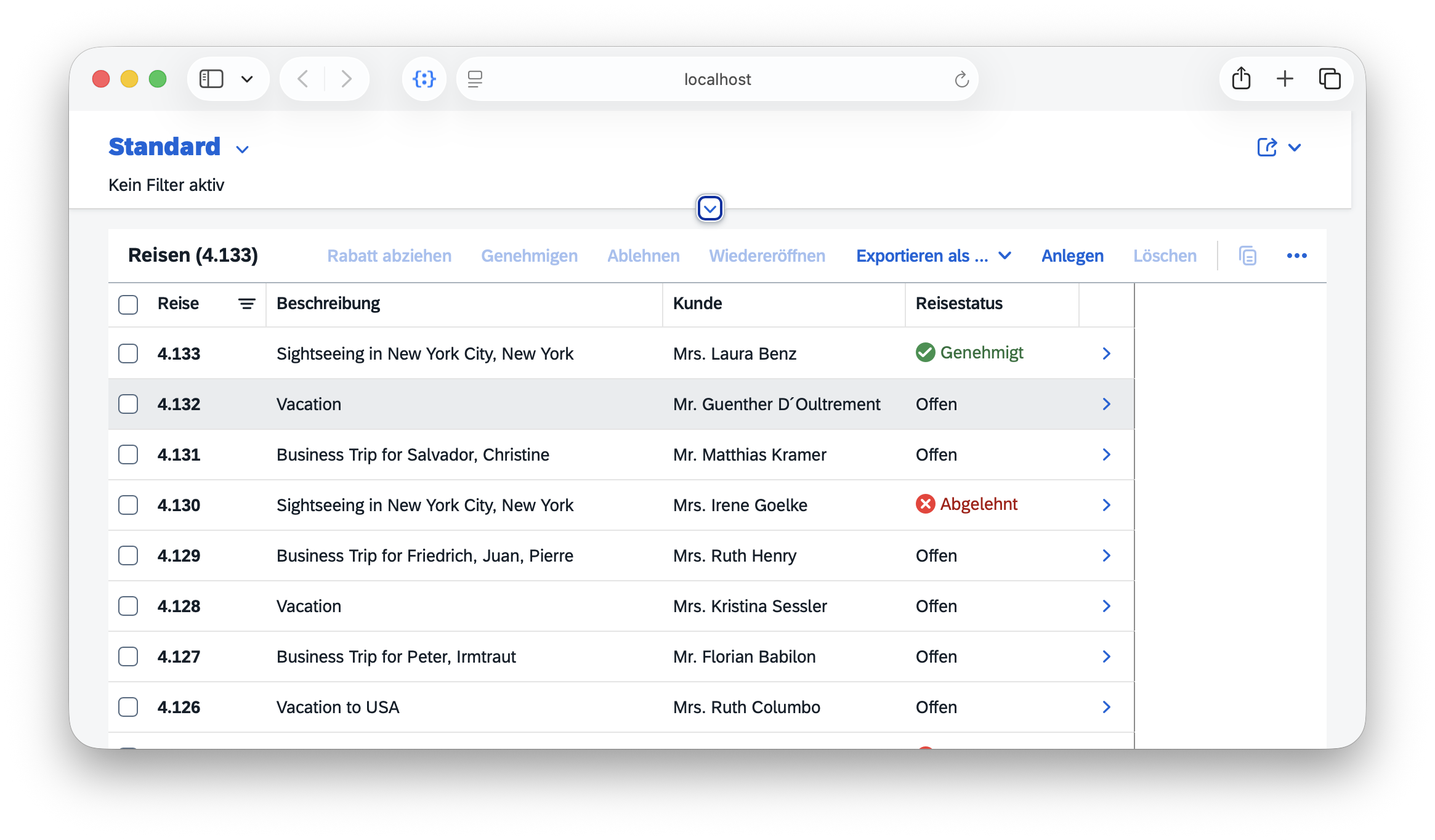
Click on the Create button (Anlegen in the screenshot above) to start a new travel plan using the Fiori UI, in which we need to correctly fill in the required details and correctly select flights.
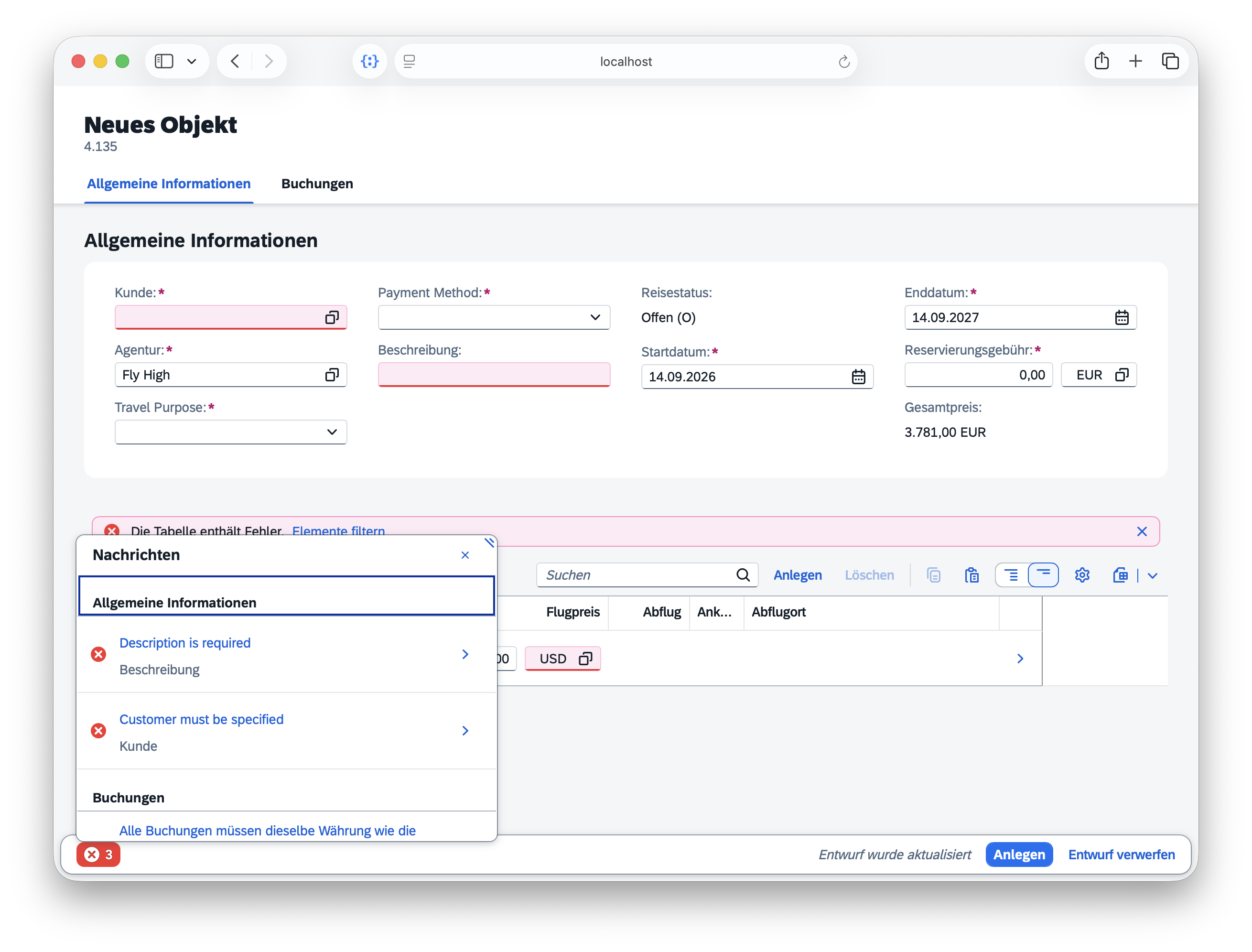
We'll quickly note how hard it is to use that UI to manually fill in all the required details for a new travel plan. Even more hard work had to be spent by the developers before to design and implement that UI. And we didn't even integrate booking events and hotels into that sample so far.
This is exactly where the MCP services come into play, automating much of the planning and booking process, and hence saving us as developers having to implement all the intricate details manually.
MCP Services
MCP-enable given Services
Instead of implementing static UIs, we merely annotate the existing service definitions with @mcp to make them available for automated planning and booking from AI agents:
@mcp service EventsService { ... }@mcp service HotelsService { ... }@mcp service FlightsService { ... }Just another protocol
From CAP's perspective, MCP is just another protocol, and hence the @mcp annotation just another protocol annotation, similar to @hcql, @odata, @rest or @graphql.
Add Tailored MCP Services
In case of the XTravels application we choose to not just @mcp-enable the existing TravelService, as that is tailored for usage from Fiori clients, and therefore exposes a lot of entities, mostly for value helps. All these extra entities would not be required for MCP usages, but rather pollute context windows with add unnecessary complexity. Instead, we add a separate, streamlined MCP service as follows:
@mcp service TravelAgentService {

  @readonly entity Customers as projection on s4.Customers;

  action createTravel (
    Customer_ID : String(6) @mandatory,
    Description : String  @mandatory,
    Bookings : many {
      Flight_ID     : String;
      Flight_date   : Date;
      FlightPrice   : Decimal;
      Currency_code : String;
    }
  ) returns {
    ID        : Integer;
    BeginDate : Date;
    EndDate   : Date;
  };
}
Prefer tailored services
In case of question, always prefer using tailored, use case-oriented services. Especially for AI-driven planning and booking this is key to avoid polluting and eating up context windows when following the one-service-to-serve-all anti pattern.
Test-drive with OpenCode
CAP puts a main focus on fast inner-loop development and iterative testing, making it easy to quickly see the effects of changes in your services. This also holds true for MCP-enabled services, which we can test locally using local installations of OpenCode, Claude Code, or any other MCP client.
With the above changes, restart your CAP server in a terminal:
cds w xtravelsIn a separate terminal, start OpenCode:
opencode
Enter a prompt, such as:
Plan a trip to Sapphire 27You should see something like this:

- Answer questions the agent asks you back.
- When asked to provide a customer name, enter Anne Pratt.

Custom Agents
In the previous sections, we have seen that the generic build agent in OpenCode can handle travel planning and booking tasks, just with MCP. That's because travel planning and booking is a well-known domain, and most LLMs have been trained to understand it effectively. That said, for more specialized domains or unique workflows, that would not be the case, but custom agents can fill the gap.
'Agentify' given Services
So, we start by turning some of our existing services into agents, using the @agent annotation, as shown below.
@agent:'/agent' service TravelAgentService { ... }@agent service EventsService { ... }@agent service HotelsService { ... }The TravelAgentService is our root agent that coordinates travel planning and booking across multiple destinations. It shall interact with the EventsService and HotelsService as subagents via A2A. In contrast to the latter, it shall keep using the FlightsService service via MCP, so we don't turn it into an agent.
Tip
Simply checkout the aix branch of the xtravels repository to get the complete implementation of the agents:
cd xtravels
git checkout aix
cd -
Add Custom Markdowns
In order to provide additional instructions and make move to a more deterministic behavior for the TravelAgent, we add an AGENTS.md as well as */SKILL.md files for the individual subtasks.
srv/travel-agent/
 ├── AGENTS.md           # next to the service definition
 ├── skills/
 │ ├── flight-booking/SKILL.md
 │ ├── itinerary-summary/SKILL.md
 │ ├── persist-itinerary/SKILL.md
 │ └── trip-planning/SKILL.md
 ├── service.cds         # the service definition
 └── service.js          # next to the service definition
Inspect these files in VS Code to understand how the instructions and guidelines are structured for the agents.
Test-drive with Chat Client
Again, start the CAP server as an all-in-one instance, with mocked required services, and we would see in the log that the agent is connecting to the LLM, as shown below:
cds w xtravels[agents] - cds.connect.to 'llm' with: {
kind: 'anthropic',
model: 'claude-sonnet-4-6',
credentials: {
anthropicApiUrl: 'http://localhost:6655/anthropic/',
apiKey: '***'
}
}Tip
See Automatic Config in the CAP Agents documentation for details.
But instead of using OpenCode as a generic client, we use the Chat Preview provided by the cap-js/agent plugin, which you can open from Preview links that are available in the index.html for A2A agent endpoints – or simply open http://localhost:4005/agent/preview.

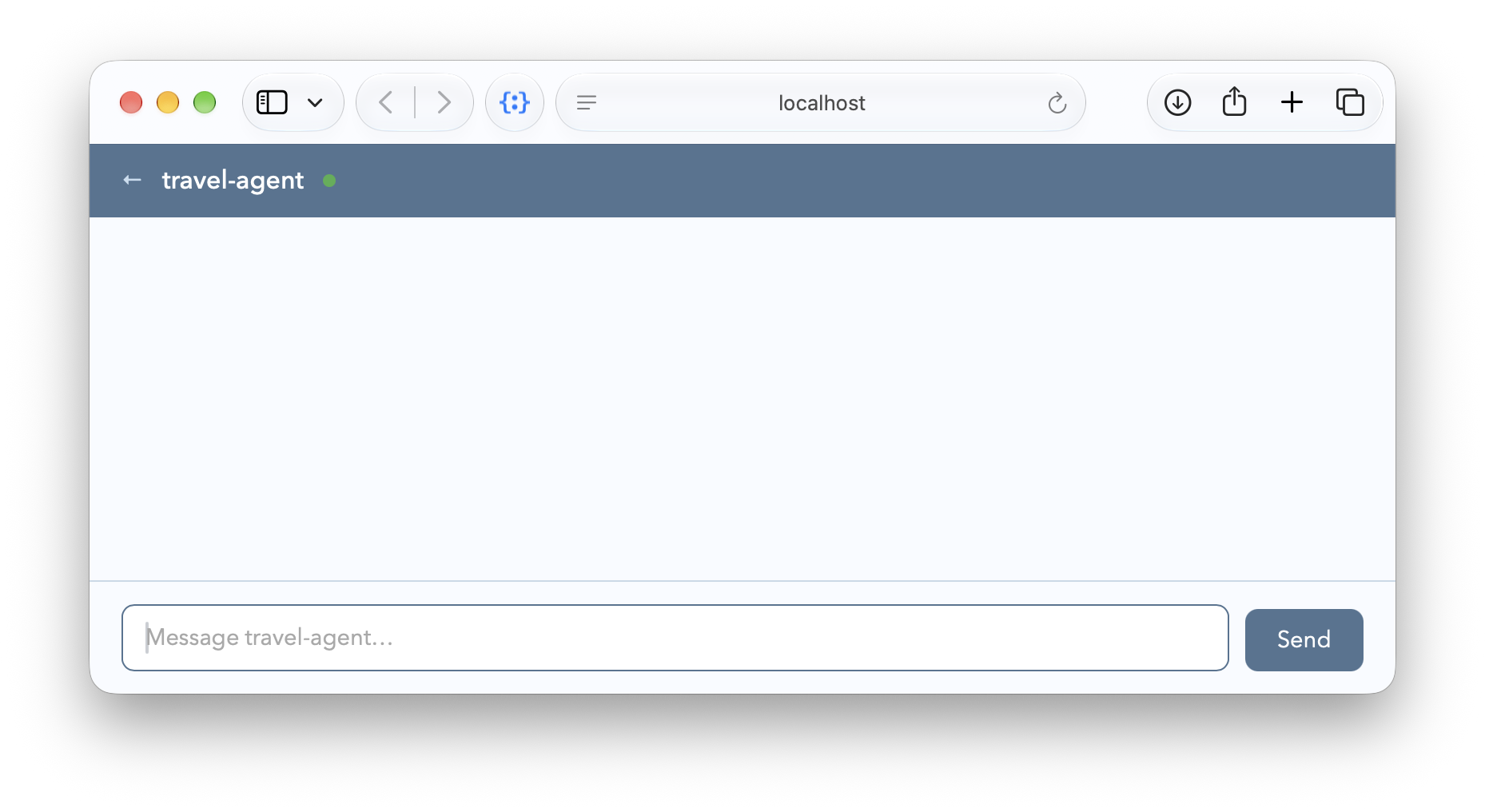
Now, enter the same prompts as you did before in OpenCode:
Plan a trip to Sapphire 27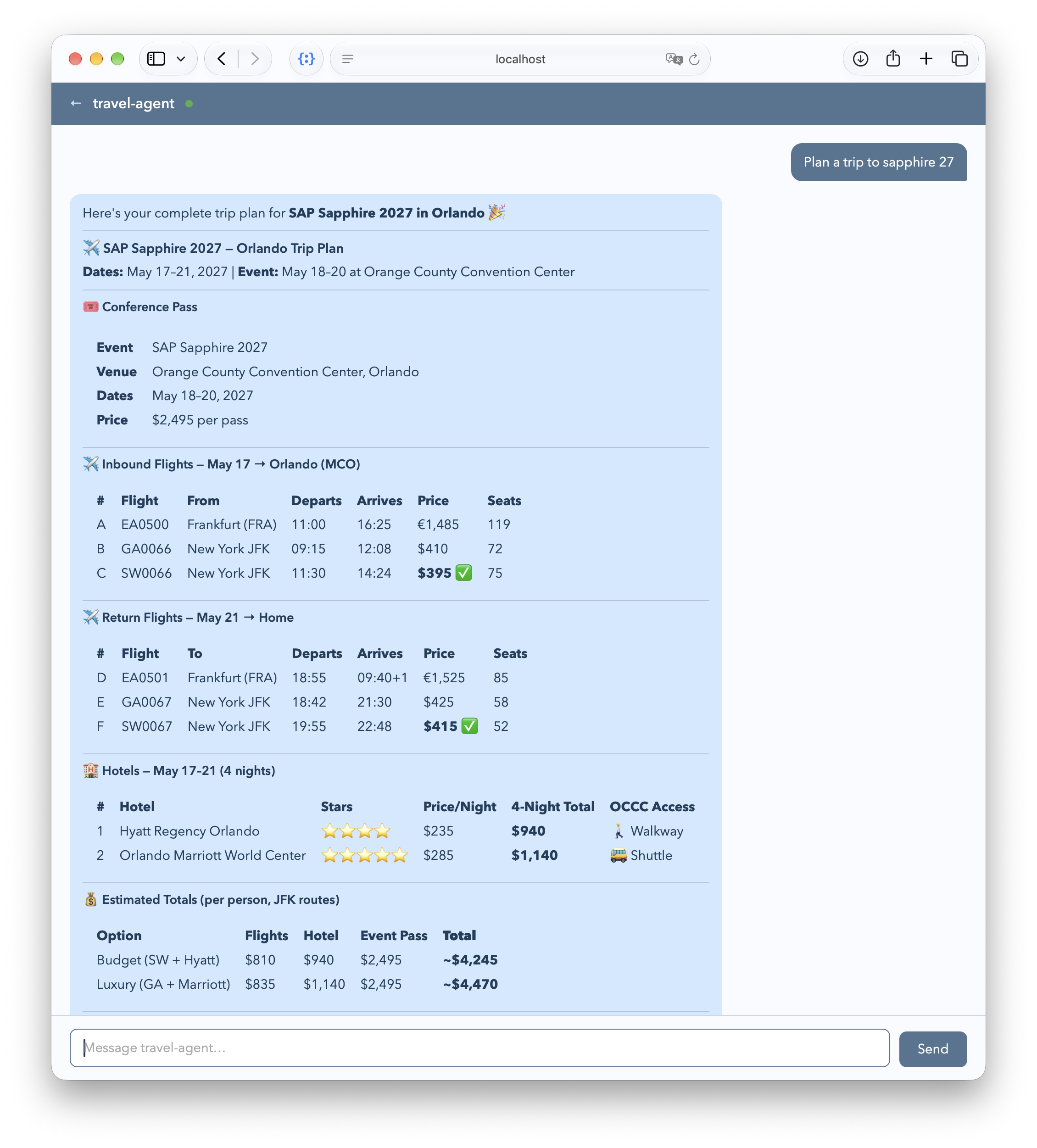
And when the agent asks you for more details or clarifications, provide the necessary information – for example, the traveller's name, airport, and preferred hotel:
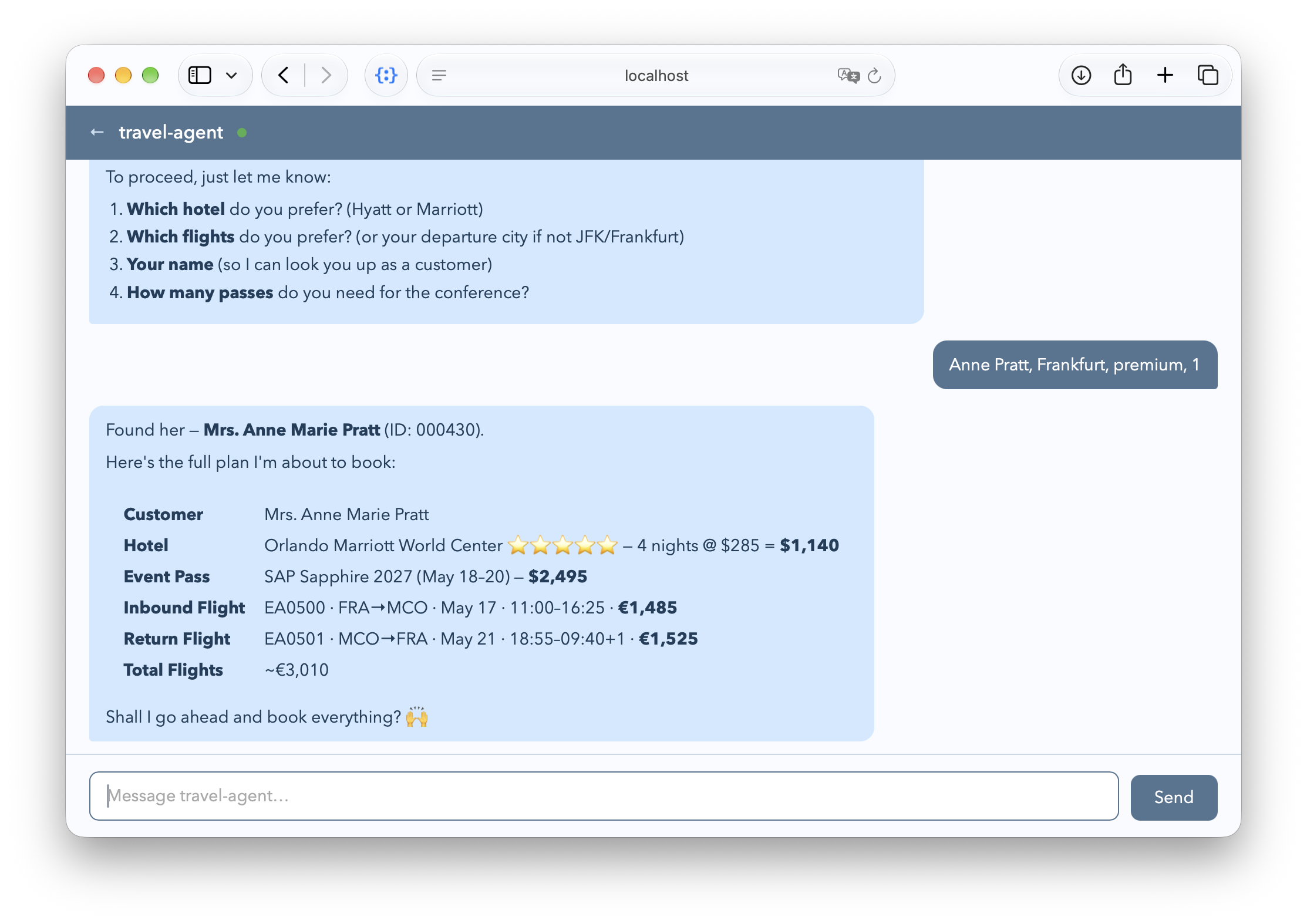
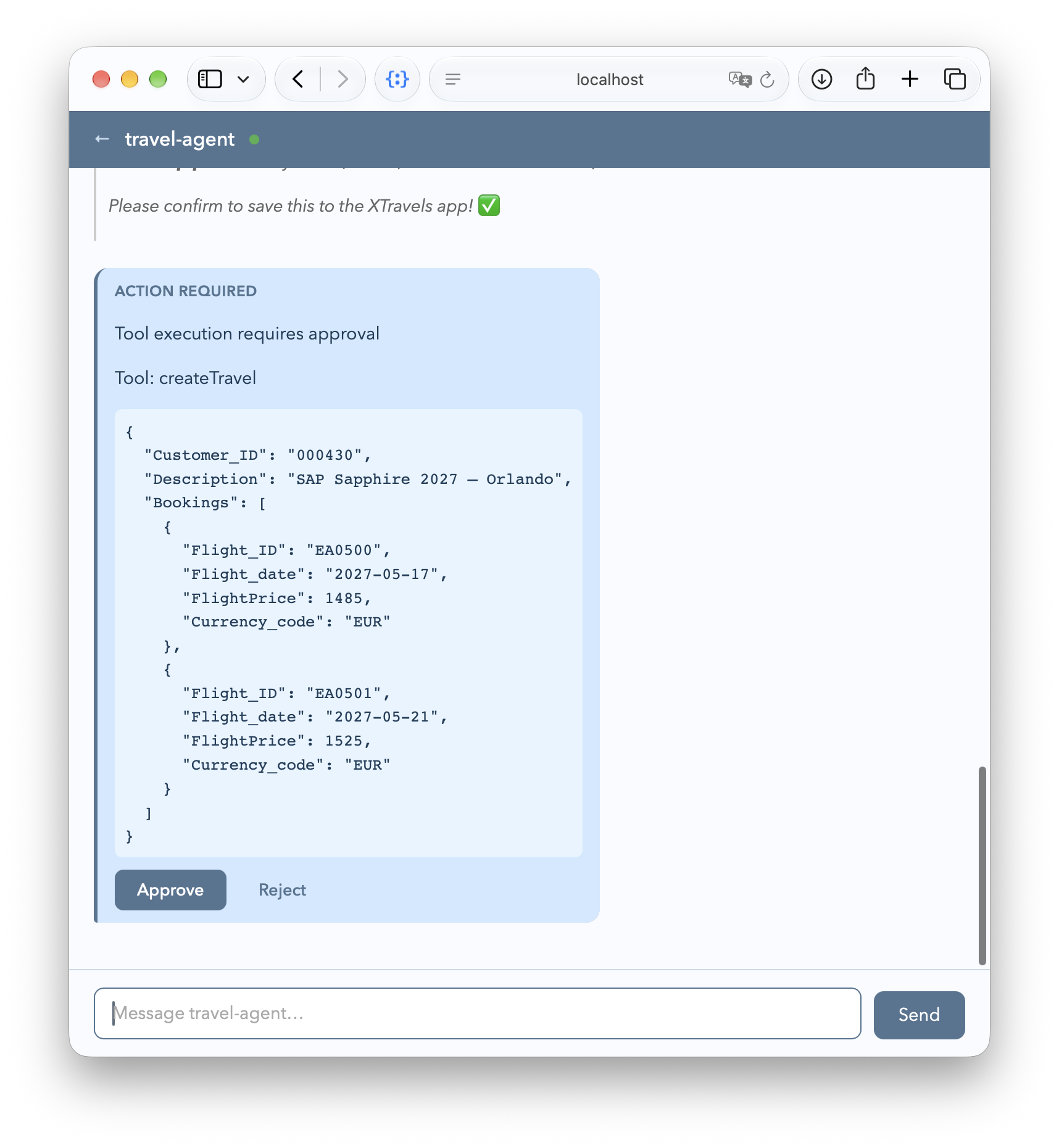
Finally, allow the agent to call the createTravel action – which is annotated with @agent.hitl – when prompted:
Run Services Separately
To run the XTravels application with its services separately, you can start each service in its own terminal window. CAP's late-cut microservices capabilities allows us to easily do so. Actually, with the need for tight integration gone, the services have no knowledge about or dependency on each other. We could also think of them as being developed and operated by independent teams, and only composed by the travel planning agent.
Run each of the lines below in a separate terminal, in the given order:
cds w xtravels/srv/eventscds w xtravels/srv/hotelscds w xflightscds w xtravelsIn the log output of each @agent-ified service, that is for events, hotels, and travels, we see the cds.connect to 'llm' taking place:
[agents] - cds.connect.to 'llm' with: {
  kind: 'anthropic',
  model: 'claude-sonnet-4-6',
  credentials: {
    anthropicApiUrl: 'http://localhost:6655/anthropic/',
    apiKey: '***'
  }
}Then test-drive the XTravels application by interacting with the agents through OpenCode or the Chat Preview as documented above, starting with the same prompt:
Plan a trip to sapphire 27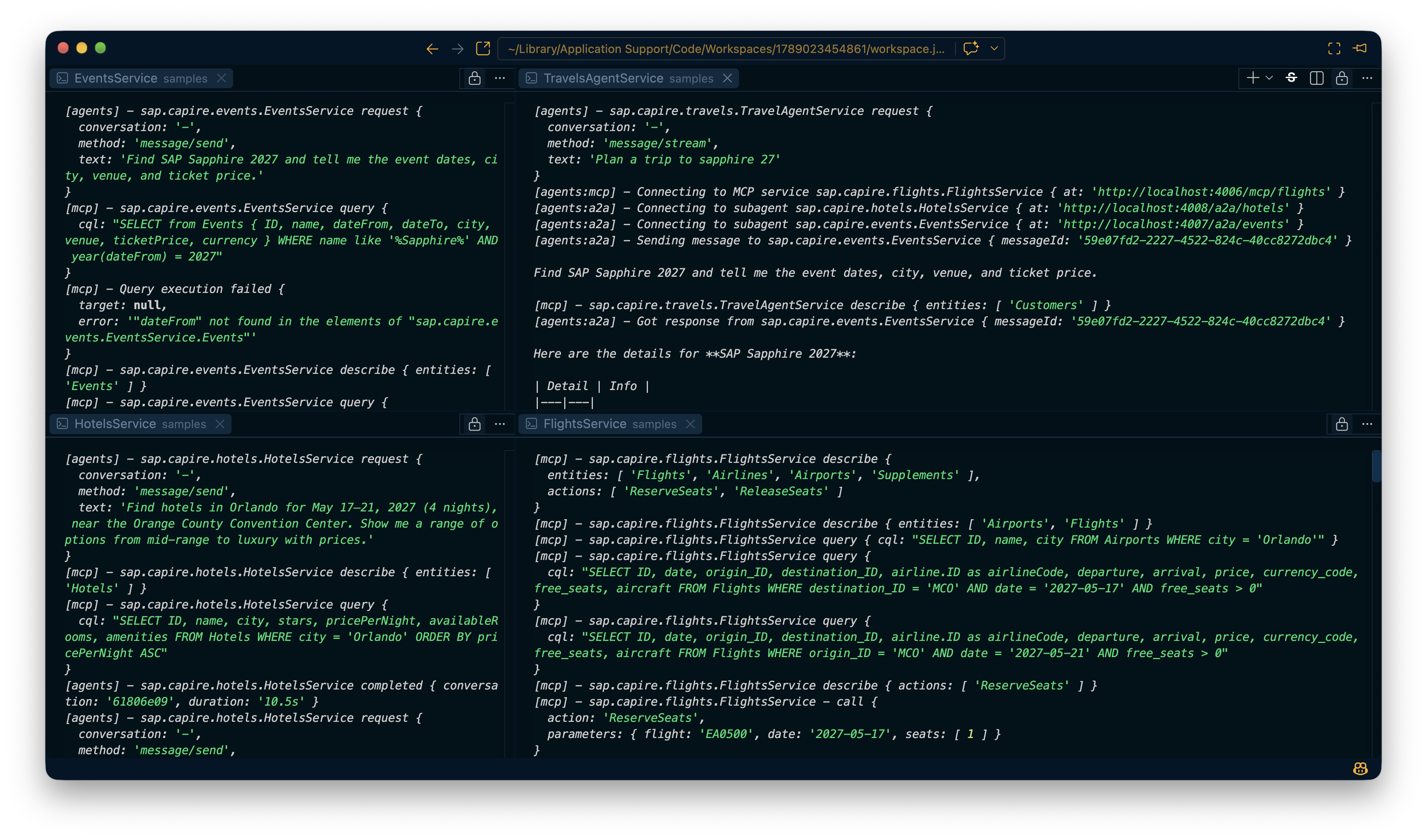
Calling Remote MCP Services
Looking closer at the log output, we can see that as soon as the TravelAgentService starts in response to the initial user request, it immediately connects to the remote FlightsService service via MCP:
[agents] - sap.capire.travels.TravelAgentService request {
  conversation: '-',
  method: 'message/stream',
  text: 'Plan a trip to sapphire 27'
}
[agents:mcp] - Connecting to MCP service sap.capire.flights.FlightsService {
  at: 'http://localhost:4006/mcp/flights'
}
Means that the TravelAgentService is auto-wired to the FlightsService through the MCP protocol, allowing it to request flight information as part of handling the user's travel planning request.
Processed by the remote FlightsService
In the log output of the xflights process, we can see the incoming MCP requests from the TravelAgentService being received and processed by the FlightsService:
[mcp] - sap.capire.flights.FlightsService describe {
  entities: [ 'Flights', 'Airlines', 'Airports', 'Supplements' ],
  actions: [ 'ReserveSeats', 'ReleaseSeats' ]
}
[mcp] - sap.capire.flights.FlightsService describe {
  entities: [ 'Airports', 'Flights' ]
}
[mcp] - sap.capire.flights.FlightsService query {
  cql: "SELECT ID, name, city FROM Airports WHERE city = 'Orlando'"
}
[mcp] - sap.capire.flights.FlightsService query {
  cql: "SELECT ID, date, origin.city, destination.city, ... from Flights
  WHERE destination_ID = 'MCO' AND date = '2027-05-17' AND free_seats > 0"
}
...
Delegation to Subagents
Immediately after connecting to the MCP service, we see that the TravelAgentService also connects to the HotelsService and EventsService, this time through the A2A protocol:
[agents:a2a] - Connecting to subagent sap.capire.hotels.HotelsService {
  at: 'http://localhost:4008/a2a/hotels'
}
[agents:a2a] - Connecting to subagent sap.capire.events.EventsService {
  at: 'http://localhost:4007/a2a/events'
}
With that the root agent served by TravelAgentService is able to delegate individual subtasks to the HotelsService and EventsService. This happens through natural language requests sent via A2A, as we can see in the subsequent log outputs of the travels app:
[agents:a2a] - Sending message to sap.capire.events.EventsService {
  messageId: '59e07fd2-2227-4522-824c-40cc8272dbc4'
}

Find SAP Sapphire 2027 and tell me the event dates, city, venue, and prices.
Processed in remote subagents
In the log output of the events process, we can see the incomming A2A message received by the EventsService and processed via service-local MCP queries:
[agents] - sap.capire.events.EventsService request {
  conversation: '-',
  method: 'message/send',
  text: 'Find SAP Sapphire 2027 and tell me the event dates, city, venue, and prices.'
}

[mcp] - sap.capire.events.EventsService describe { entities: [ 'Events' ] }
[mcp] - sap.capire.events.EventsService query {
  cql: "SELECT from Events {
    ID, name, startDate, endDate, city, venue, price
  } WHERE name like '%Sapphire%' AND year(startDate) = 2027"
}
[agents] - sap.capire.events.EventsService completed {
  conversation: 'd5fdcec4',
  duration: '7.9s'
}
Similar for the booking subtask delegated to the EventsService later on, which the subagent processes by call-ing its local action bookTicket:
[agents] - sap.capire.events.EventsService request {
  conversation: '-',
  method: 'message/send',
  text: `Book 1 attendee pass for SAP Sapphire 2027 in Orlando
    for guest "Mrs. Anne Marie Pratt".`
}
[mcp] - sap.capire.events.EventsService describe { entities: [ 'Events' ] }
[mcp] - sap.capire.events.EventsService query {
  cql: "SELECT ID, name, city, country, venue, ... FROM Events
  WHERE name like '%Sapphire%' AND city like '%Orlando%'"
}
[mcp] - sap.capire.events.EventsService - call bookTicket {
  eventId: '4505f22c-817c-4db1-841c-afa9351b93ca',
  guest: 'Mrs. Anne Marie Pratt',
  seats: 1
}
[agents] - sap.capire.events.EventsService completed {
  conversation: '790039b6',
  duration: '9.1s'
}
Conclusion
In this guide, we have walked through the process of setting up and interacting with CAP Services in the XTravels samplefrom using Generative AI on two levels:
First we had MCP Services consumed directly from an AI client, like OpenCode, Claude Code, or Joule Work, as illustrated below.
 MCP only
Next, we turned our CAP Services into Custom Agents consumed via A2A from Chat Preview, with sub tasks factored out into subagents, as illustrated below.

The following table highlights some key differences between both approaches.
| Aspect | MCP Services | Custom Agents |
|---|---|---|
| Client | Full-blown Generic AI client | Simple chat client (Browser-based) |
| Agent(s) | Generic agent provided by client | Custom agents in CAP apps |
| ReAct loops | Running within the client | Running within CAP apps |
| Knowledge | Works for well-known domains | Works also for specialized domains |
| Workflows | Best suited to well-known workflows that the model can handle from service metadata. | Supports specialized workflows through custom agents and explicit delegation. |
The table below highlights some key differences between the classic UI-centric approach and the agentic approach:
| Aspect | Classic UI-centric approach | Agentic approach |
|---|---|---|
| User interaction | Tedious: Users fill in forms and screens manually. | Automated. Users describe their goal, and the agents handle the rest. |
| Application UI | Requires purpose-built screens for planning, selection, validation, and booking. | Hardly any UIs required. Only one left to display and approve Travel requests; largely read-only. |
| Service integration | Applications need deep integration with the backend services they use. | Services are completely decoupled. The agents do all integration. |
| Development effort | High. Due to complex workflows that span multiple services, as well as intricate UI requirements. | Low. Teams define focused services and agent instructions, while the agents handle more orchestration. |
| Flexibility | New scenarios often require substantial changes to the UI and integration code. | Agents easily and automatically serve various use cases in an ad-hoc and adaptive manner. |
Done, q.e.d.
We've demonstrated that we can indeed save quite some development efforts, as well as improving end user experience significantly, by letting agents do the heavy lifting and automate things for us.